Access Your Home Security Camera Anytime, Anywhere with DDNS
DDNS
DDNS is a technology that binds dynamically changing public network IP addresses with fixed domain names in real time, mainly used to solve the problem of remote access in dynamic IP environments.
Imagine you’ve set up a security camera at home to monitor your property while you're away on vacation. Your internet service provider assigns your home a new IP address every few days—meaning the camera’s address keeps changing. Without DDNS, you’d have to manually check your current IP and update your app every time it changes. With DDNS, you simply assign a consistent domain name like myhomecam.ddns.net. No matter how often your IP changes, the domain always points to your camera.
Now, you can securely view live footage from your phone, tablet, or laptop—anytime, anywhere—without the hassle of tracking IP updates.
Steps:
-
Register for a DDNS Service: Choose a supported DDNS service provider, such as ChangeIP, No-IP, or DynDNS. Register an account on the provider's official website and obtain a free or custom domain name.
-
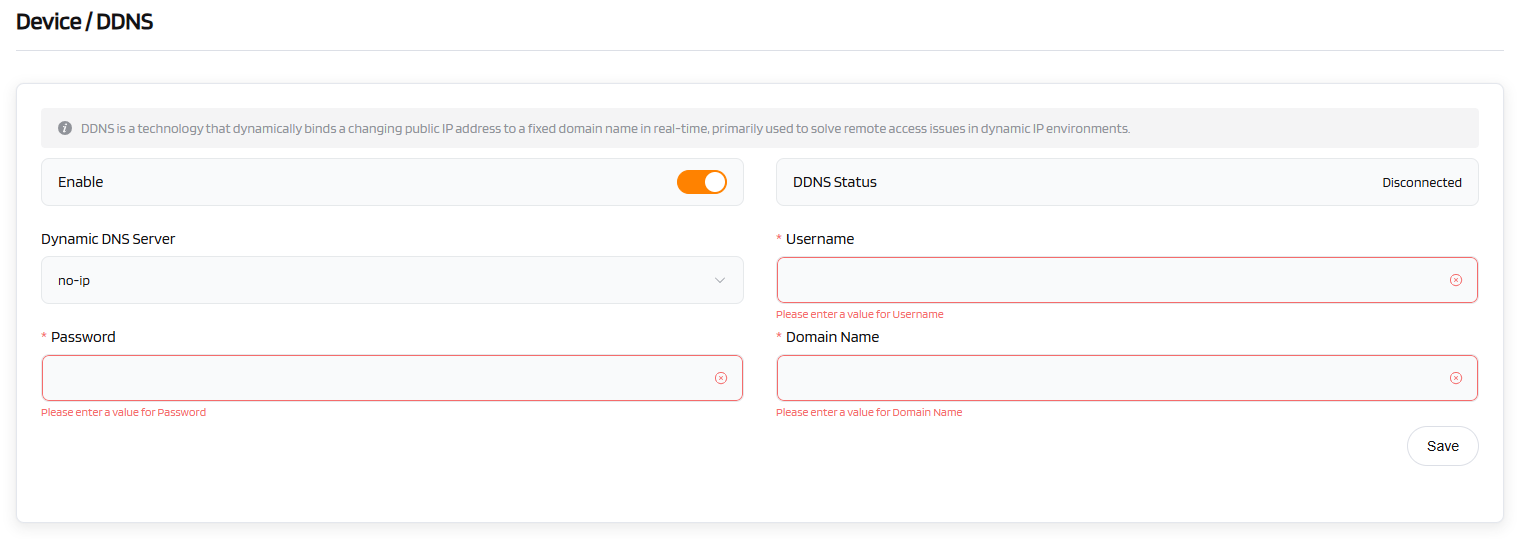
Configure DDNS on the Router:
- On the DDNS settings page, select your service provider (Dynamic DNS Server).
- Fill in the registered Username, Password, and Domain Name.
- Ensure that a message such as "DDNS saved successfully" or a similar prompt is displayed.
-
Verify Remote Access: Use the configured domain name (e.g., example.DDNS.net) to access your device from an external network.Ensure that the router has correctly forwarded the necessary ports (such as the HTTP or camera service ports).