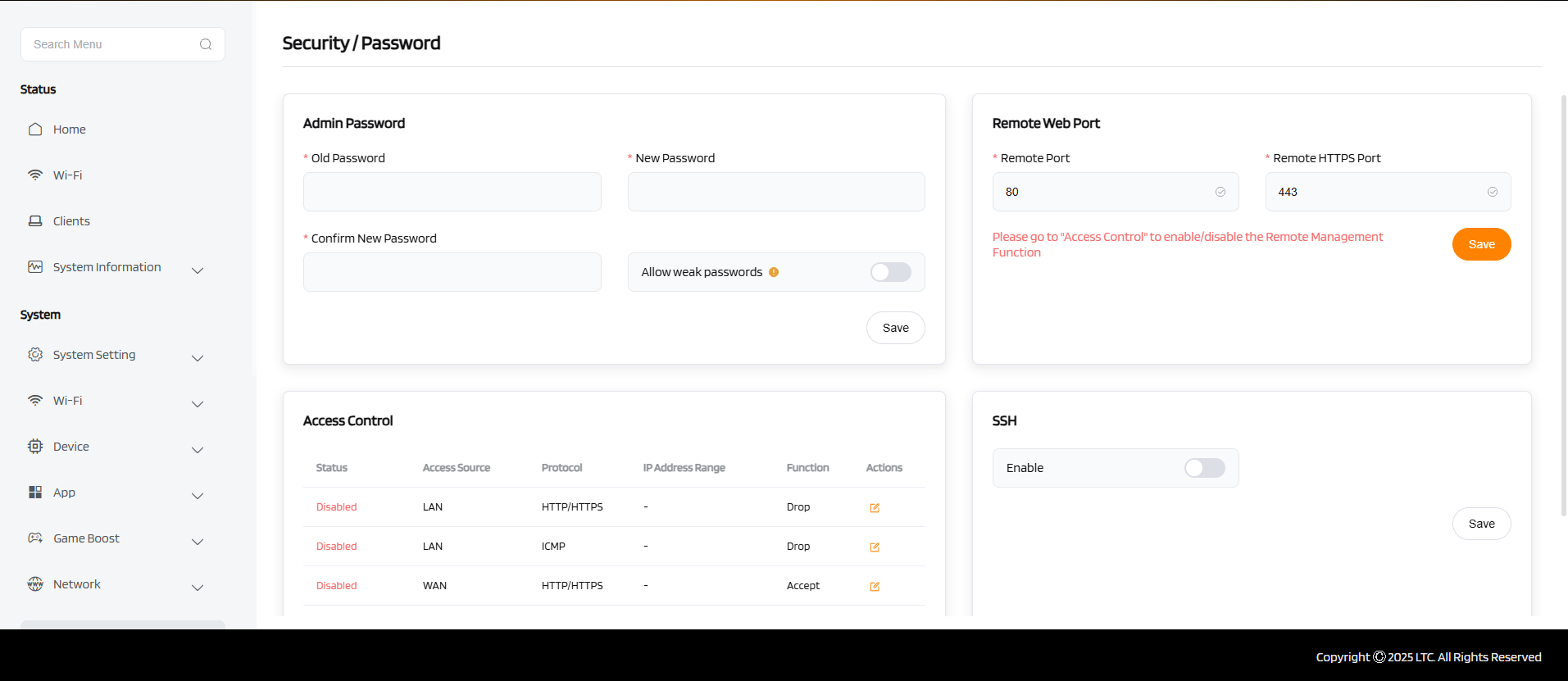
Password
Set New Password
When you set a new password, it becomes the sole method for logging into the device’s web interface or CLI. All future access attempts must use this new credential.
Allow Weak Password
Enabling this allows the use of simple or easily guessable passwords (e.g., 123456, admin).
Warning
Use only in secure, isolated networks — it reduces device security and should be disabled in production environments.
Access Control (Allow / Drop)
- Allow: Only IP addresses on the allow list can access the device. Others are blocked.
- Drop: IP addresses on the drop list are actively blocked, even if they are otherwise allowed.
This restricts management access to specific trusted sources, improving security.
Remote Port Count
Defines how many simultaneous remote connections the device can accept (e.g., via HTTP/HTTPS or Telnet). More ports allow concurrent secure connections; useful in multi-user or gateway scenarios.
Higher values support more remote users, but may affect system performance.
Enable SSH
When enabled, SSH becomes available for secure remote command-line access.
SSH encrypts all traffic and is preferred over Telnet or HTTP for remote management.
Tip
Combine strong passwords, SSH, and access control to lock down device access effectively.